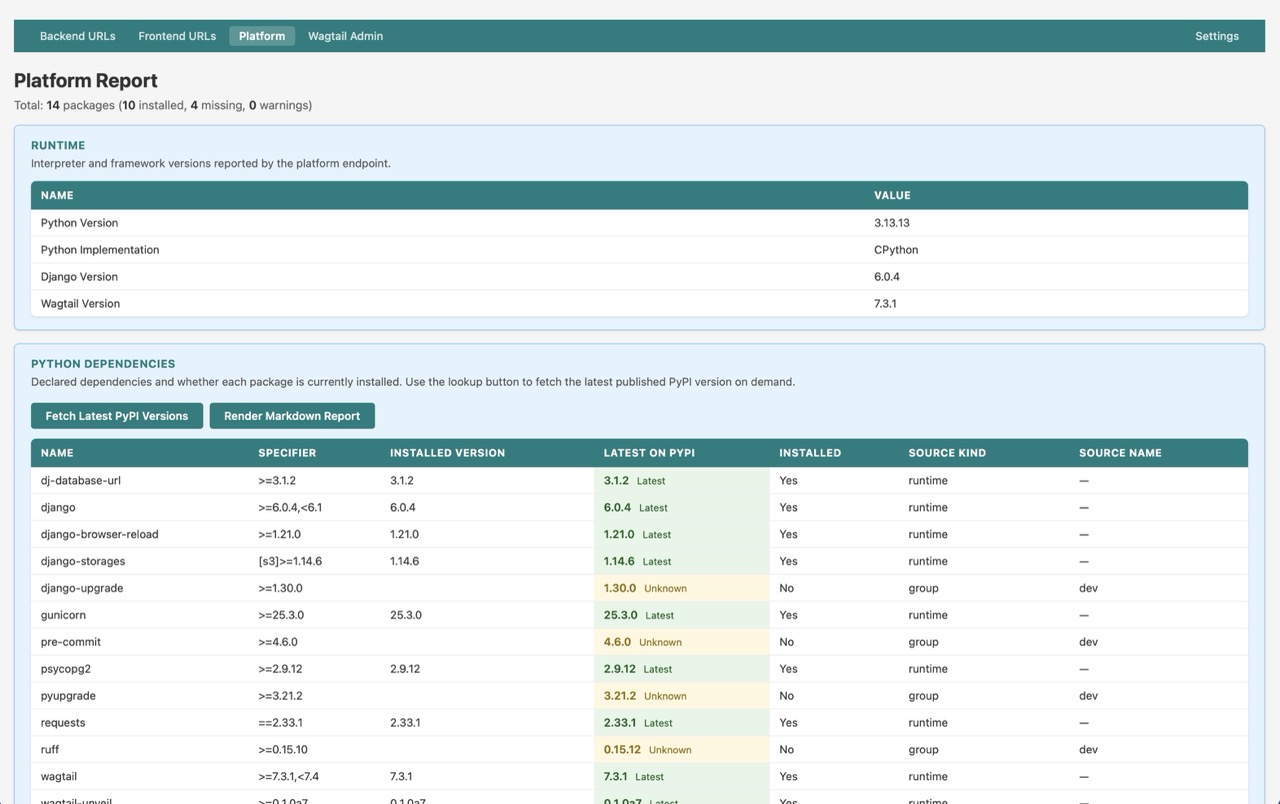
Platform Report
The platform report displays runtime versions, dependency-manifest details, Python dependency inventory, warnings, and response metadata from the platform endpoint in a browser-friendly table layout.
Access
Visit /unveil/report/platform/ while logged in as a superuser when report UI access is enabled. This is available in local development with DEBUG=True, or in non-debug environments with WAGTAIL_UNVEIL_ENABLE_PRODUCTION_REPORTS=True.
You can also reach it from the Wagtail admin dashboard panel.
Features
- Runtime overview — shows Python, Django, and Wagtail versions for the current process
- Dependency manifest diagnostics — shows the configured manifest path and detected format
- Warnings section — surfaces manifest parsing, access, or configuration warnings without failing the page
- Dependency inventory table — lists declared Python packages with specifier, installed version, installed state, source kind, and source name
- Sortable dependency columns — sort dependency rows by Name, Source Kind, and Source Name
- On-demand PyPI lookup column — fetch the latest published PyPI version for all listed packages only when requested
- Inline Markdown export — generate a raw Markdown report from the current platform data without leaving the page
- Comparison markers — label dependency rows as
Latest,Different, orUnknownbased on the installed version versus the fetched PyPI version - Response metadata — shows API version, lifecycle status, generation timestamp, and package version
- Uses the live platform endpoint — the page fetches the same versioned platform JSON used for API clients via the signed
X-Wagtail-Unveil-Report-Accessheader and authenticated superuser report access, rather than exposing the configured Bearer token to the browser
Notes
- The underlying platform endpoint still expects Bearer auth for normal API clients, even in local
DEBUG=Truedevelopment. - Plain superuser session fallback is not allowed for the platform endpoint. The built-in report uses a short-lived signed report-access token plus the superuser session for its browser fetch.
- The report is intended for local or trusted superuser debugging, and is available whenever report UI access is enabled.
- To include dependency inventory data, set
WAGTAIL_UNVEIL_PLATFORM_DEPENDENCY_FILE. - Latest-version lookups are browser-side requests to PyPI and only run after clicking the dependency-section lookup button.
- Rendering the Markdown report also triggers the same browser-side PyPI lookups automatically when latest-version data has not been fetched yet.
Related
- Settings Page — View the effective platform-related settings and resolved report/API URLs
- API Reference — Query the same platform payload directly as JSON
- Dashboard Panel — Open the report from the Wagtail admin home page
- Features Index — Back to section overview